

Call History
- View Call History:
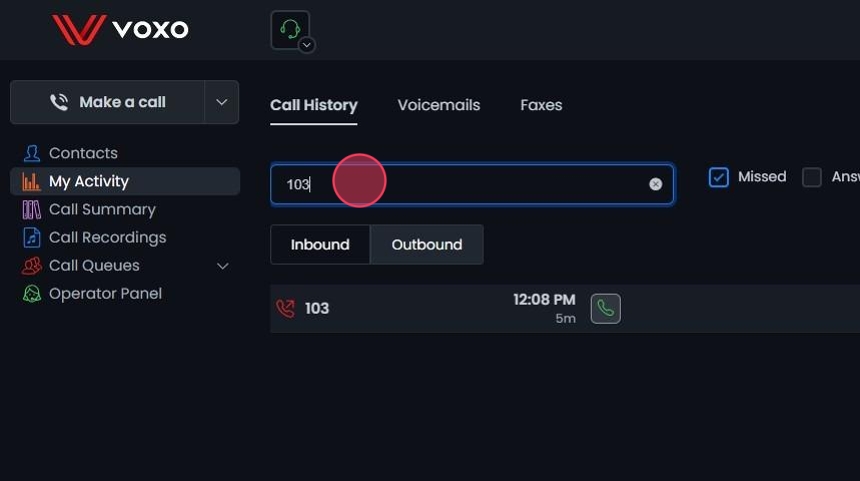
- Under My Activity, click Inbound or Outbound to view your inbound or outbound call history.

- Filter Call History:
- Place a checkmark next to Missed or Answered under My Activity to filter calls by type.

- Search Call History:
- Enter a name or phone number in the Search Number / Name field to search your call history.
- Initiate a Call:
- Click the green telephone button to initiate a call.

Voicemail
- Manage Voicemails:
- Click Voicemails to listen to, save, and delete your voicemails.

Faxes
- Manage Faxes:
- Click Faxes to manage your inbound and outbound faxes through Omnia.

- View Fax History:
- The fax history section displays your inbound and outbound fax records.
- Use the Search Faxes field to find specific faxes.
- You can download fax files for further review.

- Send a Fax:
- Enter the 10-digit number in the Enter Number field.
- Attach your file.
- Click SEND to send the fax.

Sending a Fax via Email
- Email a Fax:
- Start a new email.
- In the To field, enter: send@voxofax.com.
- In the subject line, enter the 10-digit telephone number you want to fax to (no spaces or dashes). To send to multiple numbers, separate them with commas.
- Attach a PDF to the email body and send. Only PDF format is supported for sending faxes.
- Cover pages are created and added automatically.
